免費、強大、免登入!用了這個Youtube下載網站我已經回不去了|Free, powerful, no login required! Using this YouTube download website, I can't go back now
Pearcleaner
Support thks : https://www.paypal.me/haotech….
VideoDL是什麼
這是一款免費且無需註冊的線上影片下載工具,主要用於從 YouTube 下載影片或音訊
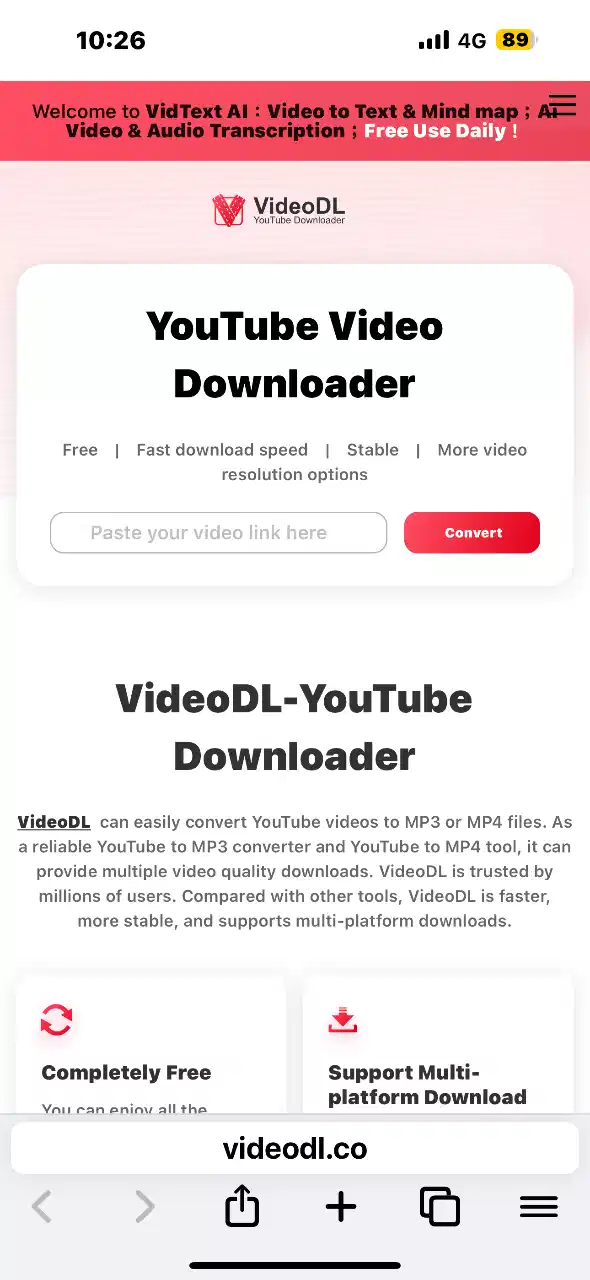
VideoDL 是一個線上工具,允許使用者將 YouTube 影片轉換並下載為 MP4 或 MP3 格式。其特點包括:
- 完全免費:無需支付任何費用即可使用所有功能。
- 無需註冊:使用者無需創建帳號即可下載影片。
- 多格式支援:支援多種影片與音訊格式,包括 MP4、MP3、AVI、FLV 等。
- 多解析度選擇:提供從 360p 到 4K 的多種解析度選項。
- 跨平台相容:可在各大瀏覽器上使用,包括 Chrome、Safari、Firefox 等。
- 快速下載:提供高速且穩定的下載體驗。
VideoDL是一款免費且無需註冊的線上影片下載工具,主要用於從 YouTube 下載影片或音訊。使用者只需貼上影片連結,選擇所需的格式與解析度,即可快速下載高品質的 MP4 或 MP3 檔案。VideoDL 支援多種格式與解析度,並可在各大瀏覽器上使用,提供簡單、快速且安全的下載體驗。
This is a free and registration-free online video download tool primarily used for downloading videos or messages from YouTube.
VideoDL is an online tool that allows users to convert and download YouTube videos in MP4 or MP3 format. Its features include:
- Completely free: all features are available for free.
- No registration required: Users can download videos without creating an account.
- Multi-format support: Supports multiple film and audio formats, including MP4, MP3, AVI, FLV, etc.
- Multiple Resolution Options: Offers resolution choices ranging from 360p to 4K.
- Cross-platform compatibility: compatible with various browsers, including Chrome, Safari, Firefox, etc.
- Quick Download: Providing a fast and stable download experience.
VideoDL is a free and unregistered online video download tool primarily used for downloading videos or messages from YouTube. Users only need to attach the video link, choose the desired format and resolution, and quickly download high-quality MP4 or MP3 files. VideoDL supports multiple formats and resolutions and is available across various browsers, providing a simple, fast, and secure download experience.
Direct Links
IF want Support Me :
NEW iPA :
I’ve noticed that not many people know about this trick. If your phone ends up on a blacklist or gets revoked, there’s a way to clear it without losing any data—as long as your device is running iOS versions between 15 and 18.2 beta2. I’ve tried it out, and honestly, it’s pretty slick.
What I like about it:
- No data loss at all—your info stays safe.
- It’s really fast and you just need to run a few lines of code.
- The process is straightforward if you follow the video guide step by step.
Downsides to keep in mind:
- It only works on some devices (iOS 15 up to iOS 18.2 beta2).
- You’ll need a computer to make it happen.
- A little bit of coding knowledge is necessary, so it might be a bit daunting if you’re not comfortable with that.
Overall, if your device qualifies, this method is a super convenient and quick fix. Just be sure to double-check that your iOS version is within range before giving it a go—and follow the instructions carefully to avoid any hiccups.
Youtube download web:
If you think my blog is good, give me a sopport, it’s cool, have a nice day!🤗