寫得漂亮又安全!我為什麼愛上熊掌記 Bear 筆記 App | Written beautifully and safely! Why I Fell in Love with Bear's Palm Bear Notes App
Support thks : https://www.paypal.me/haotech….
解鎖會員 Unlock pro
如果你正在尋找一款漂亮又實用的筆記 App,我推薦 熊掌記 Bear。它支援 Markdown 語法、密碼保護、跨裝置同步,特別適合寫作、筆記與知識整理。(無需購買解鎖專業版)所有功能均可使用
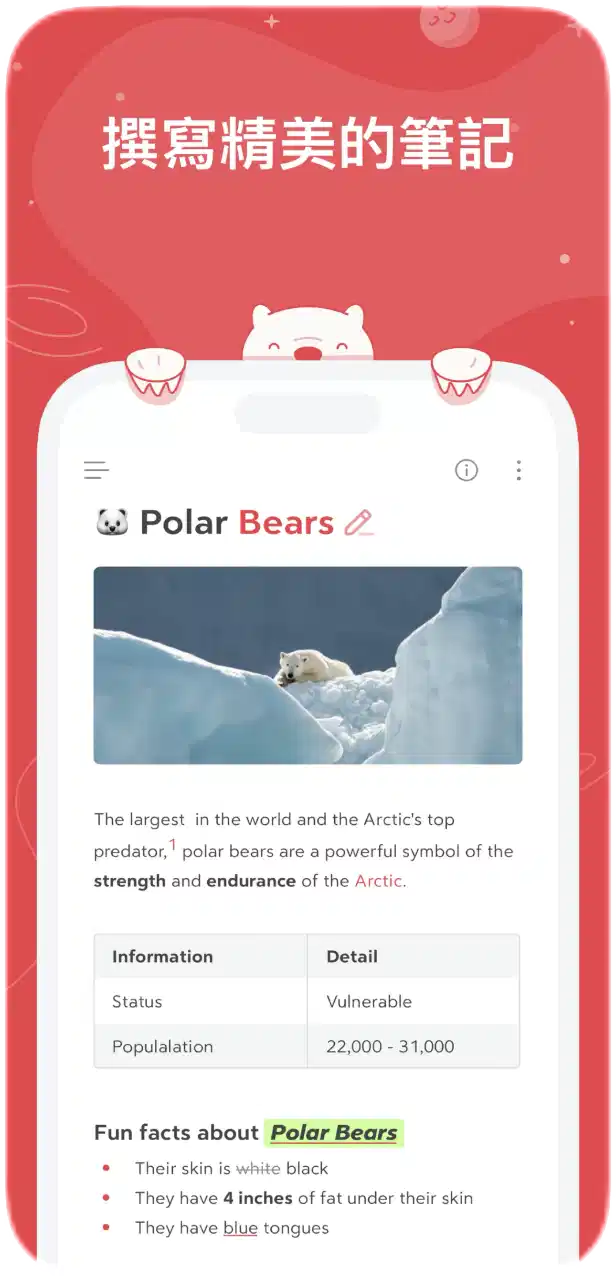
- App 名稱:熊掌記(Bear)
- 開發者:Shiny Frog Ltd.
- 分類:生產力工具(Productivity)
- 平台:iOS(iPhone、iPad)、macOS(也有 Mac 版)
- 語言支援:支援多國語言,包括繁體中文
- 定價:免費下載,部分功能需訂閱 Bear Pro
- 私人筆記與日記:支援文字、圖片、標籤管理等。
- Markdown 支援:原生支援 Markdown 語法,適合寫作與程式筆記。
- 跨裝置同步:透過 iCloud 實現 iPhone、iPad、Mac 同步。
- 密碼保護與加密:可加密筆記,提高隱私性。
- 匯出功能:可匯出為 PDF、Word、HTML 等格式。(已解鎖)
- 漂亮的介面:以簡潔、現代設計著稱。
If you are looking for a beautiful and practical note-taking app, I recommend Bear’s Palm. It supports Markdown syntax, password protection, and cross-device synchronization, making it particularly suitable for writing, note-taking, and knowledge organization. All features are available (no need to purchase the Professional Edition).
- App Name: Bear Palm Chronicles
- Developers: Shiny Frog Ltd.
- Classification: Productivity Tools
- Platform: iOS (iPhone, iPad), macOS (also available on Mac)
- Language Support: Supports multiple languages, including Traditional Chinese
- Pricing: Free download, some features require a subscription to Bear Pro
- Private notes and diaries: supporting text, images, label management, and more.
- Markdown Support: Native support for Markdown syntax, suitable for writing and programming notes.
- Cross-device synchronization: Achieving iPhone, iPad, and Mac synchronization through iCloud.
- Password Protection and Encryption: Encryptable notes to enhance privacy.
- Export function: Can be exported in formats such as PDF, Word, HTML, etc. (Unlocked)
- Beautiful interface: known for its simple and modern design.
Direct Links
IF want Support Me :
NEW iPA :
I’ve noticed that not many people know about this trick. If your phone ends up on a blacklist or gets revoked, there’s a way to clear it without losing any data—as long as your device is running iOS versions between 15 and 18.2 beta2. I’ve tried it out, and honestly, it’s pretty slick.
What I like about it:
- No data loss at all—your info stays safe.
- It’s really fast and you just need to run a few lines of code.
- The process is straightforward if you follow the video guide step by step.
Downsides to keep in mind:
- It only works on some devices (iOS 15 up to iOS 18.2 beta2).
- You’ll need a computer to make it happen.
- A little bit of coding knowledge is necessary, so it might be a bit daunting if you’re not comfortable with that.
Overall, if your device qualifies, this method is a super convenient and quick fix. Just be sure to double-check that your iOS version is within range before giving it a go—and follow the instructions carefully to avoid any hiccups.
我发现知道这个小窍门的人并不多。 如果你的手机被列入黑名单或被撤销,只要你的设备运行的 iOS 版本在 15 到 18.2 beta2 之间,就有办法在不丢失任何数据的情况下清除黑名单。 我已经试过了,老实说,它非常实用。
我喜欢它的地方
- 数据完全不会丢失–你的信息安全无虞。
- 速度非常快,只需运行几行代码即可。
- 如果你按照视频指南一步步操作,过程也很简单。
需要注意的缺点
- 它仅适用于部分设备(iOS 15 至 iOS 18.2 beta2)。
- 你需要一台电脑来实现它。
- 需要一点编码知识,如果你不太擅长,可能会有点畏难。
总的来说,如果你的设备符合条件,这个方法是一个超级方便快捷的修复方法。 在尝试之前,请务必仔细检查你的 iOS 版本是否在范围之内,并认真按照说明操作,以避免出现任何问题。
download Appstore bear :
download Unlock bear pro :
If you think my blog is good, give me a sopport, it’s cool, have a nice day!🤗